
Unsubscribe settings
By clicking on "Unsubscribe", you will see the following:
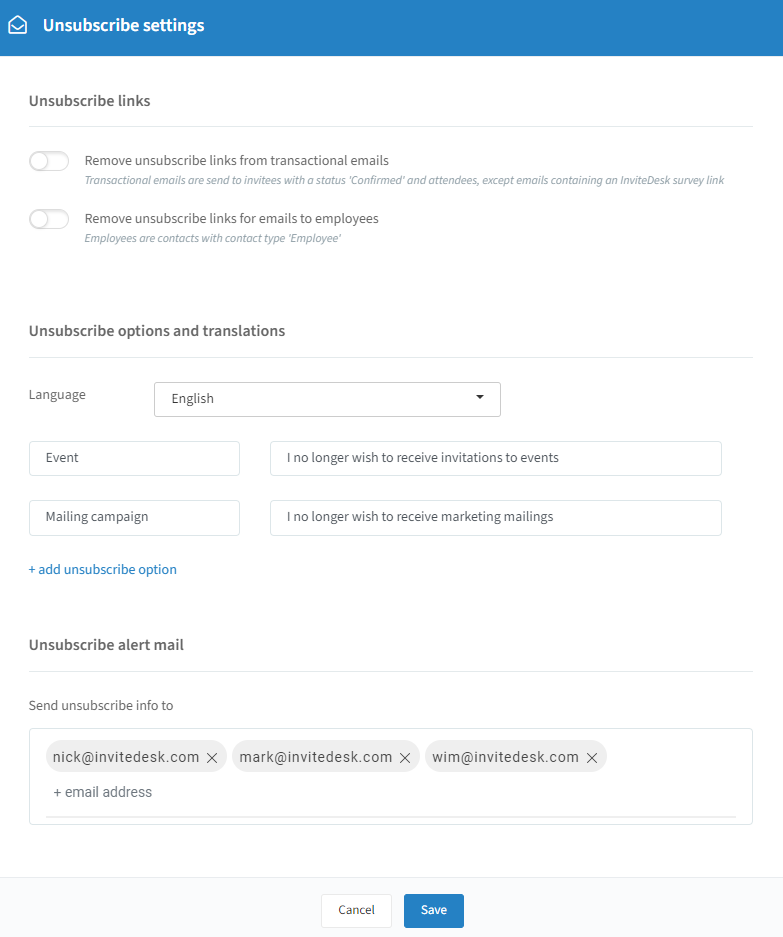
Unsubscribe links
Remove unsubscribe links from transactional emails: transactional emails are sent to invitees with the status "Confirmed" and also to attendees. This does not apply to emails containing an InviteDesk survey link.
Remove unsubscribe links for emails to employees: those are contacts labeled with contact type "Employees".
Unsubscribe options and translations
When a contact clicks the unsubscribe option at the bottom of an email, they are redirected to a page whose design depends on the template of your event or mailing campaign. There they see several ways to unsubscribe, depending on what you have created here:
Language: choose the language for which you want to change your unsubscribe info.
Add unsubscribe option: add or remove permission types via "+add unsubscribe option" or the trashcan icon, and change the text your contacts see. Note: the first two options can't be deleted, and new unsubscribe types must always have the default backup language filled in.
Unsubscribe alert mail
You can immediately receive a copy of unsubscribes at the e-mail address(es) of your choice — useful to keep track of unsubscribes or to update other databases. The mail is titled "InviteDesk - Unsubscribe request". Type in an e-mail address and press ENTER to confirm it; you can add multiple addresses.
Click on "Save" to keep any changes you have made.
Tip: in the address book you can find relevant unsubscribe information per contact — search for a contact, click the pencil icon and open the "Permissions" tab. You can see for what, by who and when a permission setting for this contact was changed: