
Events Overview
Events: Filters & actions
On the events overview, also the landing page when you log in, you will have a centralised overview of your events. You can choose to view these events as a list or with a calendar.
You can search for your events by typing something in the search field or you can sort them for example by date.
Filters
You can apply the following filters:
Default filter: Future events (including drafts). You can change this to Future events, Past events (including drafts), Deleted events, or Archived events (events become automatically archived when the date of the final venue is 30 days in the past; you can then only consult the event and clone it — see Clone or Remove an event).
Filter on the owner: you can filter on the owner of the event.
Filter on tags: you can filter on tags attached to the event.
Actions
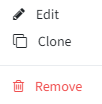
Edit: edit your created event
Clone: clone your event
Remove: remove your event
In some browsers, the 3 dots won't be visible at first. You can make them appear by zooming in or out.
Your centralised overview

Target: a hard or soft target, determined while creating your event.
Confirmed: the number of guests who have registered.
Pending: the number of guests who have received their invitation, but we are waiting for their answer.
Waiting: the number of guests added to the invitation list but who haven't received an invitation mail yet (e.g. limited places available).
Unused: the number of unused places for your event; add more people to your invitee list if you want a full house.